Owlpane / Products / Kubernetes
Infrastructure · built on OpenTelemetry Agent in betaWhat is happening inside your cluster — not just what it costs.
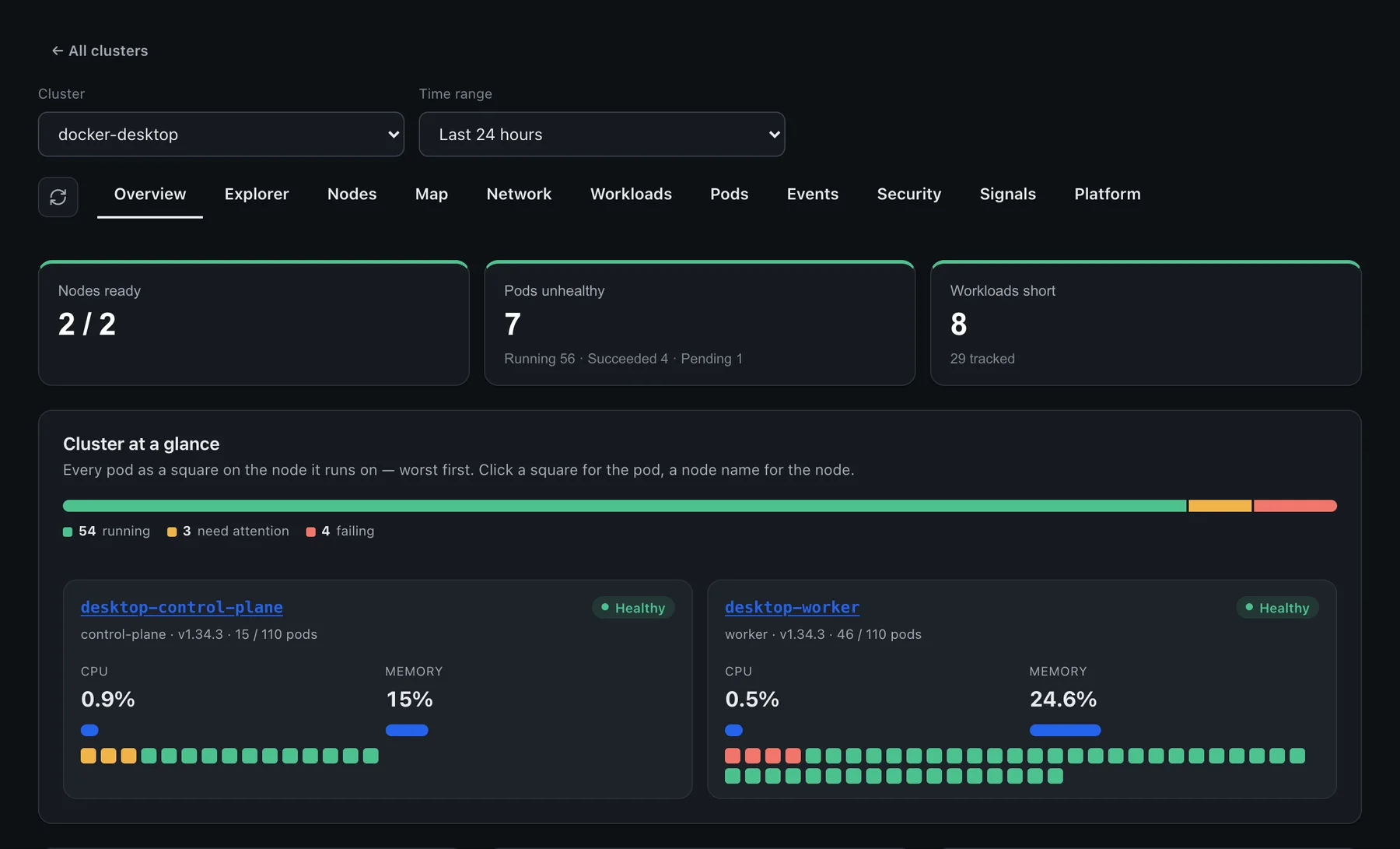
One Helm install gives you nodes, workloads, pods, services, network dependencies, security posture and safe operations, all correlated with the traces and logs your apps already send.
What you get
Kubernetes monitoring, in detail

Cluster explorer
A full inventory — workloads, services, ingresses, storage classes, ConfigMaps (key names only), policies — with pagination, so nothing is silently cut off. Cluster health at a glance with node, pod, event and CPU-requested gauges.
Node detail
Roles, taints and tolerations, capacity vs allocatable, conditions, volumes, images, and the workloads, services, ingresses and PVCs that land on that node, plus CPU and memory charts.
Pods and workloads
CPU and memory against requests and limits, restarts, reasons, and a request-rate sparkline per pod. Jump from any pod to its traces.

Network map
Topology, components, workload dependencies, flows, API calls, policies, exposure and ingress paths. Dependency edges merge observed L4 flows with APM traffic and show denied traffic.

Security posture
A CIS-aligned score, findings you can suppress with a reason and export as JSON, CSV or SARIF, RBAC bindings and roles (Kubernetes built-ins filtered by default), running images and a security audit stream.

Signals in context
Spans and logs stamped with Kubernetes attributes, grouped by time bucket. Click a bar to filter the activity list, or open the full request waterfall.
Platform objects
Helm releases (from release annotations, never Helm Secrets) with the resources in each, HPAs, PVCs, Services, Ingress, Gateway API and cert-manager certificates with days-to-expiry.
Safe operations
Restart and scale workloads, expand a PVC or apply a NetworkPolicy through an ops runner in your cluster. Every operation is queued, attributed to a person and shown with its outcome.
How it works
From zero to data in three steps
Install
One Helm chart deploys a cluster collector and node agent. Its ClusterRole is read-only (get / list / watch).
Observe
Object snapshots, kubelet metrics and events flow over OTLP. The agent has no permission to read Secrets, and the console shows ConfigMap key names only.
Act
Optionally enable the ops runner to restart, scale or expand storage from the console, with an audit trail.
helm install owlpane oci://ghcr.io/owlpane/owlpane-agent --version 0.3.2 -n owlpane \
  --set endpoint=https://ingest.example.com \
  --set cluster.name=production-eu

# read-only cluster access; optional ops runner: --set ops.enabled=true
How it compares
Honest about where we are today
Comparable to
Where Owlpane is narrower
- Network flows need flow data (owlpane.flow.*) — from the bundled network collector or forwarded from Cilium/Hubble, Beyla or Pixie. Owlpane does not ship its own eBPF probe.
- Security posture is a Kubernetes-focused check set, not a full CNAPP or SIEM; runtime threat detection (Falco, Tetragon) is something you integrate.
- No cost-optimisation engine; you get usage metering and request-vs-use views.
Comparisons reflect publicly available information as of September 2026 and our own product today, and may change. Datadog, New Relic, Grafana, Dash0, Better Stack, Amazon CloudWatch, AWS, Sentry, Dynatrace, Kubeshark, Checkly, PagerDuty, SigNoz, Kubernetes, OpenTelemetry, Prometheus and other names are trademarks of their respective owners; Owlpane is not affiliated with or endorsed by them.
More from Owlpane
Everything shares one pane
Try Kubernetes beside what you run today.
Standard OpenTelemetry in, so you can send a copy and compare. Nothing proprietary to migrate away from later.
Every new workspace starts with a 14-day Team trial: 50 GB of ingest a month and 30-day retention. No card to start. Documentation · Pricing · Pricing questions