See the carbon cost of every service. Forecast the bill.
Traces, logs, errors, background jobs, and releases in one product — priced by data, with a cap that samples instead of surprising you. Owlpane Carbon adds energy and CO₂e per service, endpoint and job on the same telemetry — on Team and above, each figure labelled measured or estimated, with its uncertainty.
Every new workspace starts with a 14-day Team trial: 50 GB of ingest a month and 30-day retention. No card to start.
Why Owlpane
Four reasons teams switch
One OpenTelemetry-native product where signals link to each other — with limits stated plainly on every comparison page.
A bill you can forecast
Priced by GB ingested, not per host, per seat or per indexed event. Team includes 50 GB; a spend cap samples instead of surprising you at month end.
Cost calculator →Logs, traces and metrics that meet
A log line opens the request that wrote it. Errors carry a sample trace. Releases sit on the same charts as latency and 5xx rate — so you follow one story, not five tabs.
See it working →OpenTelemetry in and out
OTLP and Prometheus remote write. Send a copy beside Datadog, Grafana or your self-hosted stack — nothing proprietary to undo if you leave.
Integrations →Kubernetes, SLOs and carbon on the same telemetry
Cluster inventory with pod-level drill-down, burn-rate SLO alerts, and CO₂e per service and job — measured or estimated, always labelled.
Owlpane Carbon →Compare honestly: Grafana stack · OpenObserve · Bronto · Logz.io · Datadog · Checkly
Documentation
Guides, SDKs and ingest setup
Quickstart, OpenTelemetry ingest, Node.js and Kubernetes agent install — the same paths linked from the console setup wizard.
Browse documentation →OpenTelemetry, Node.js, NestJS, Kubernetes, PostgreSQL, Redis, Prometheus, Grafana, Slack, PagerDuty, Opsgenie, Jira, and ServiceNow each have a documented connect path. See all integrations →
See it working
The real product, not a mock-up.
Every screen below is a screenshot of the Owlpane console. Watch what each one tells you, or click a step to jump to it.
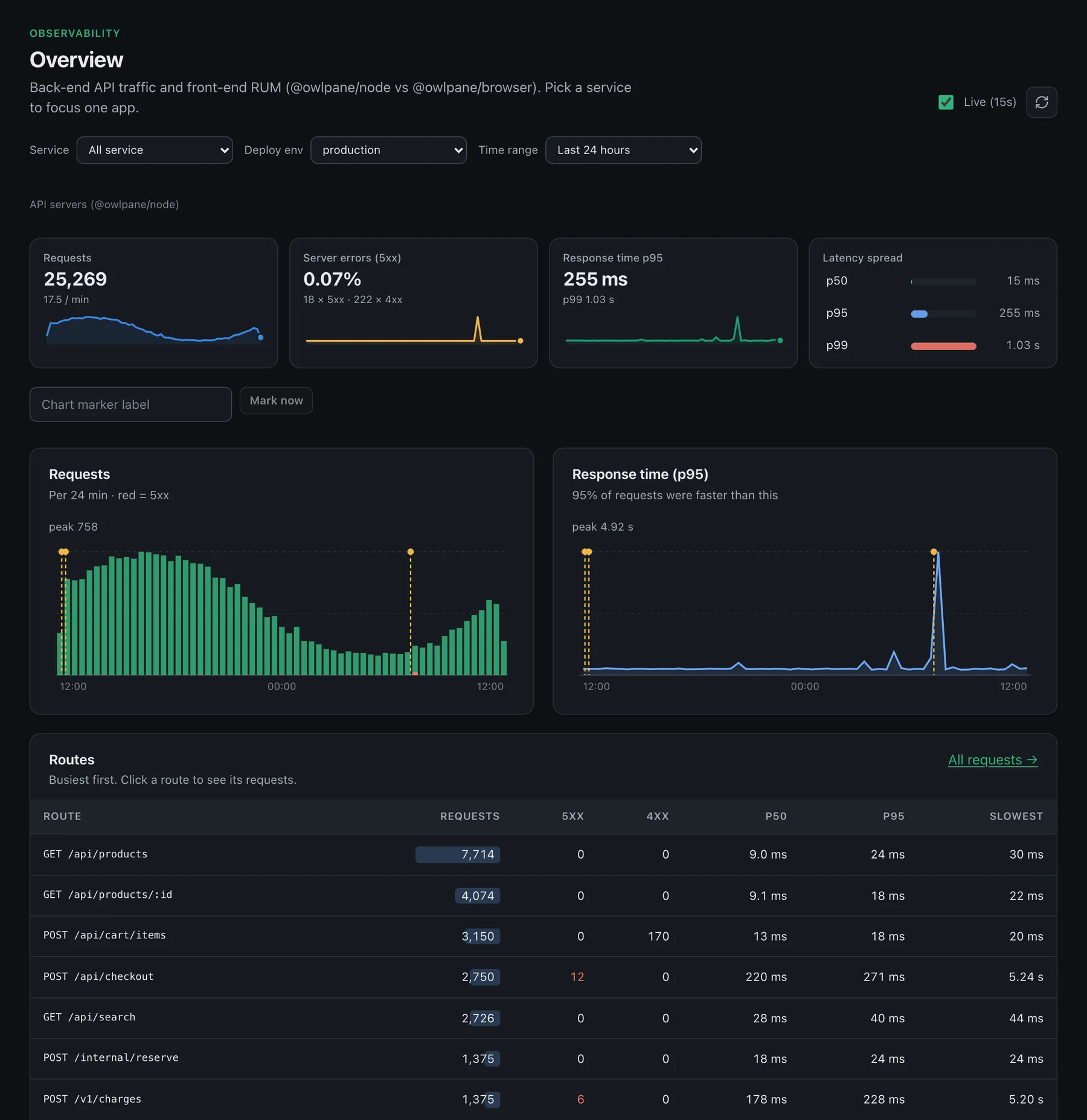
Know how your API is doing the moment you open it.
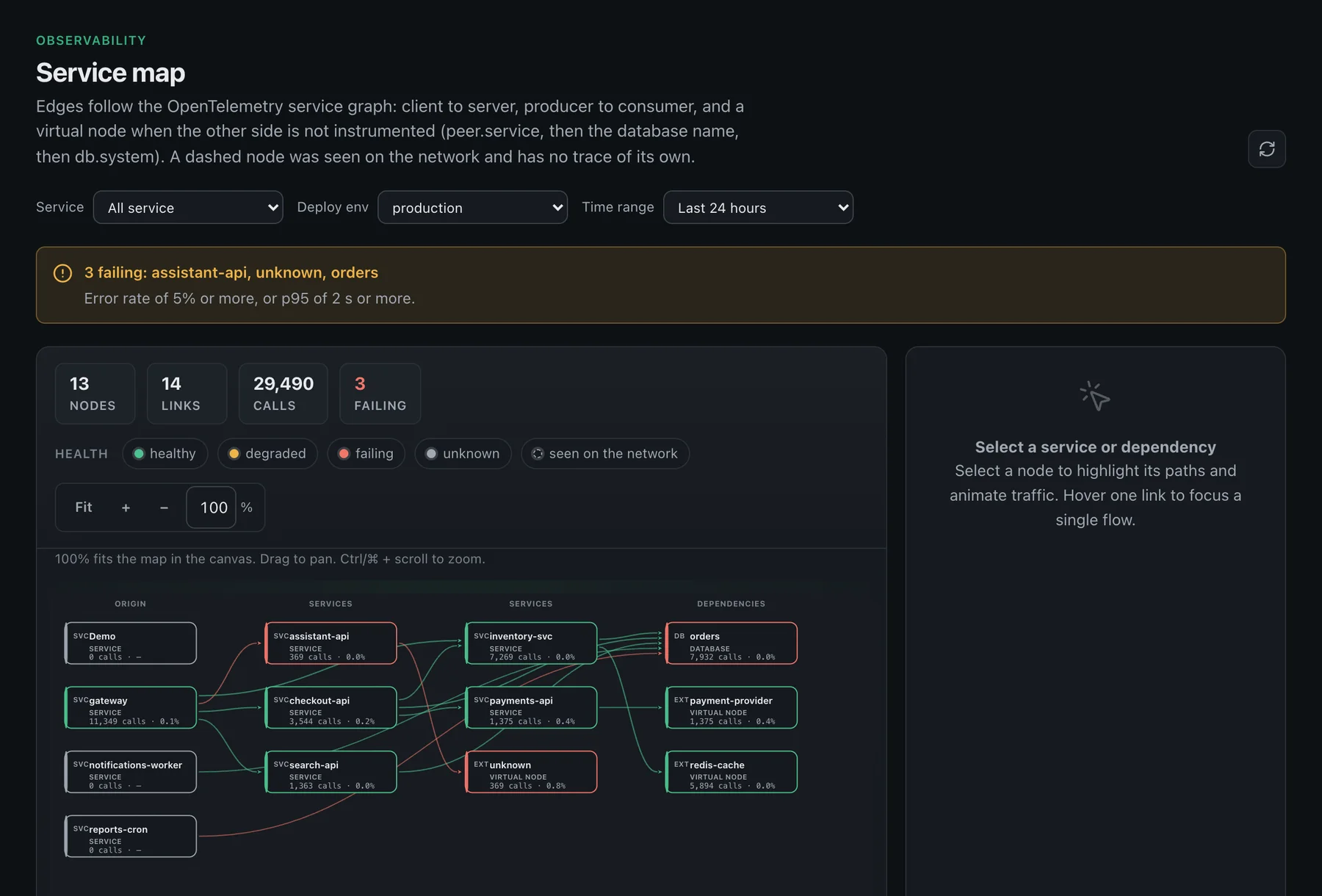
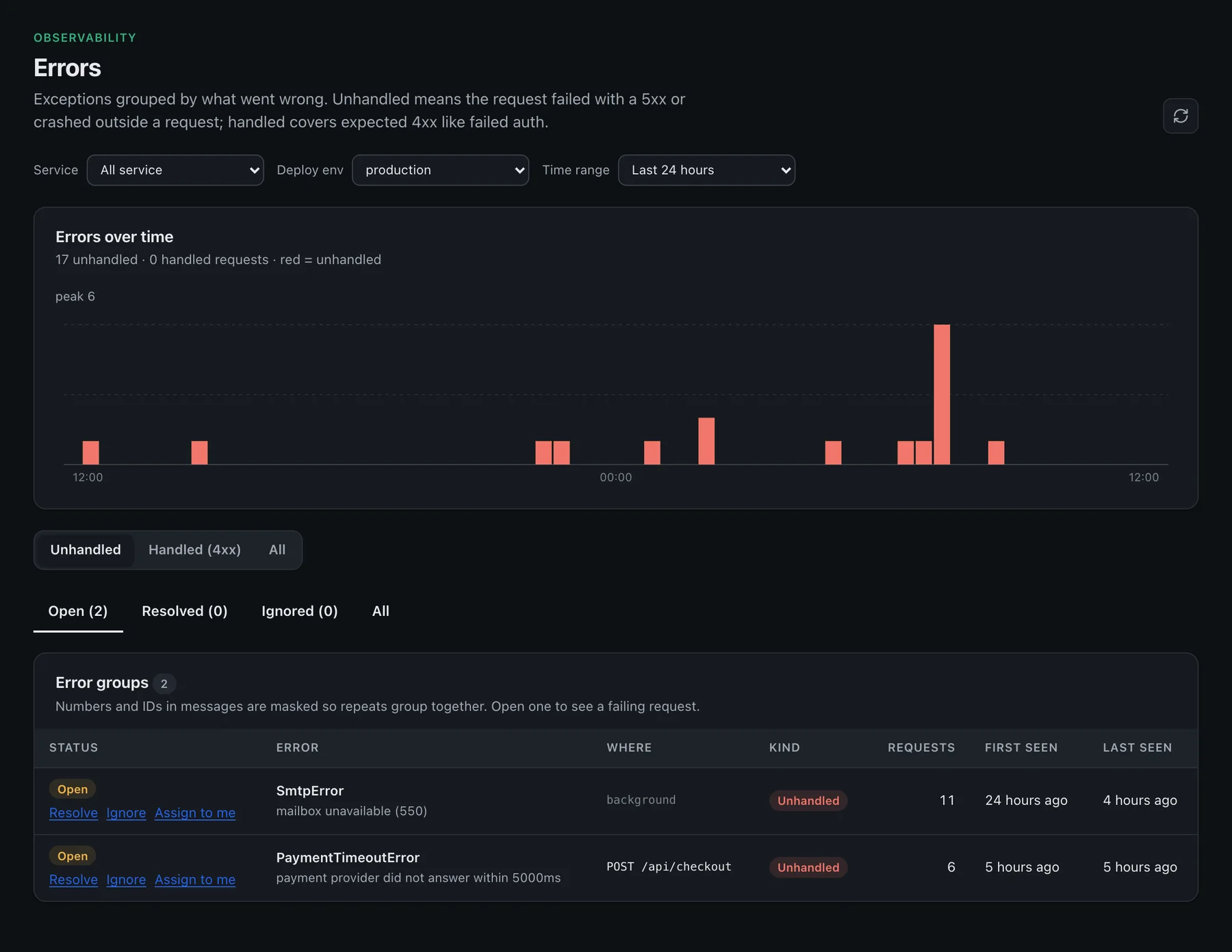
Traffic, errors and latency for every back-end service, the map of who calls whom, and the errors grouped by what went wrong.
- Overview
- Service map
- Errors
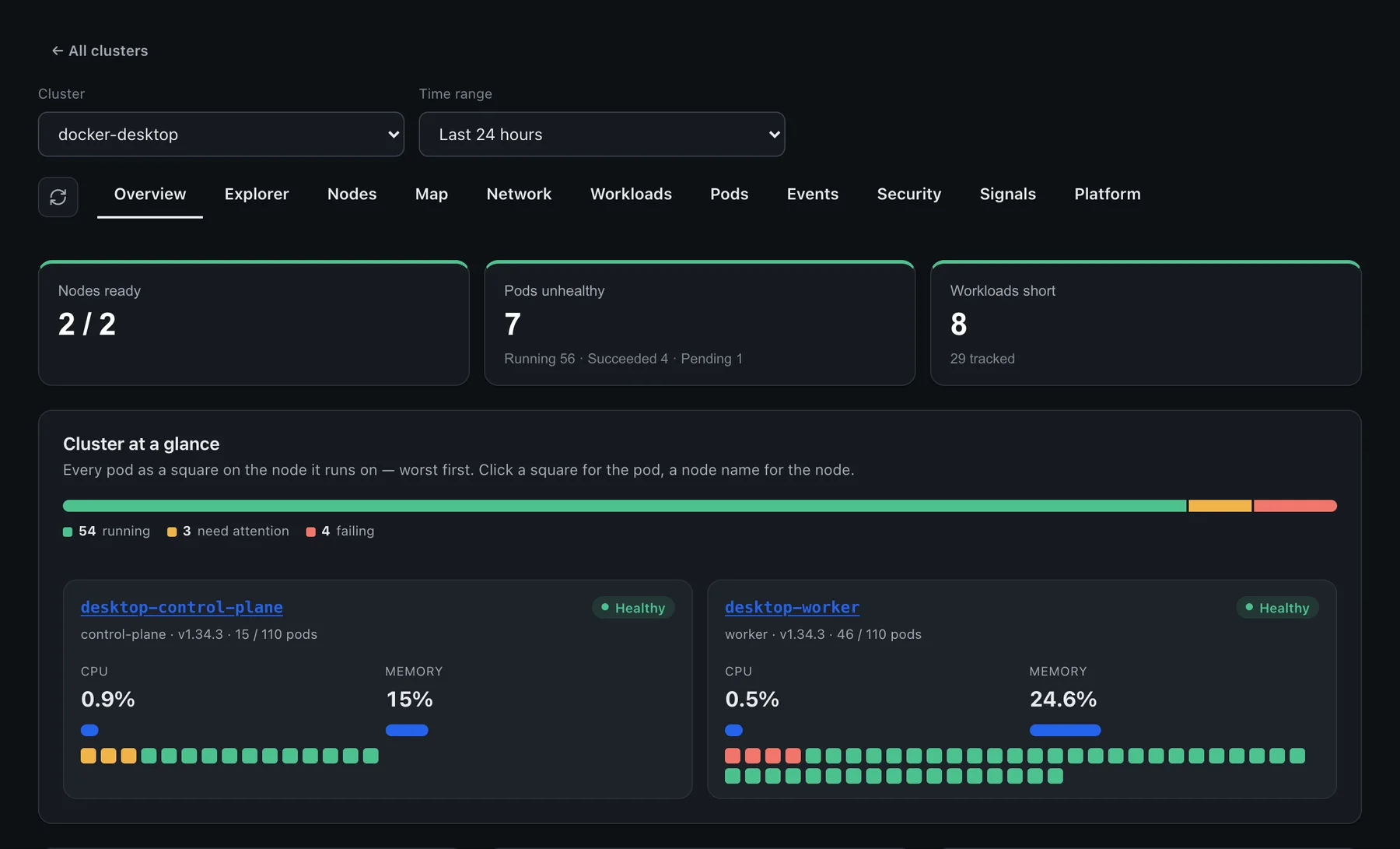
Every pod, drawn on the node it runs on.
A cluster you can read in five seconds: what is running, what needs attention and what is failing, worst first.
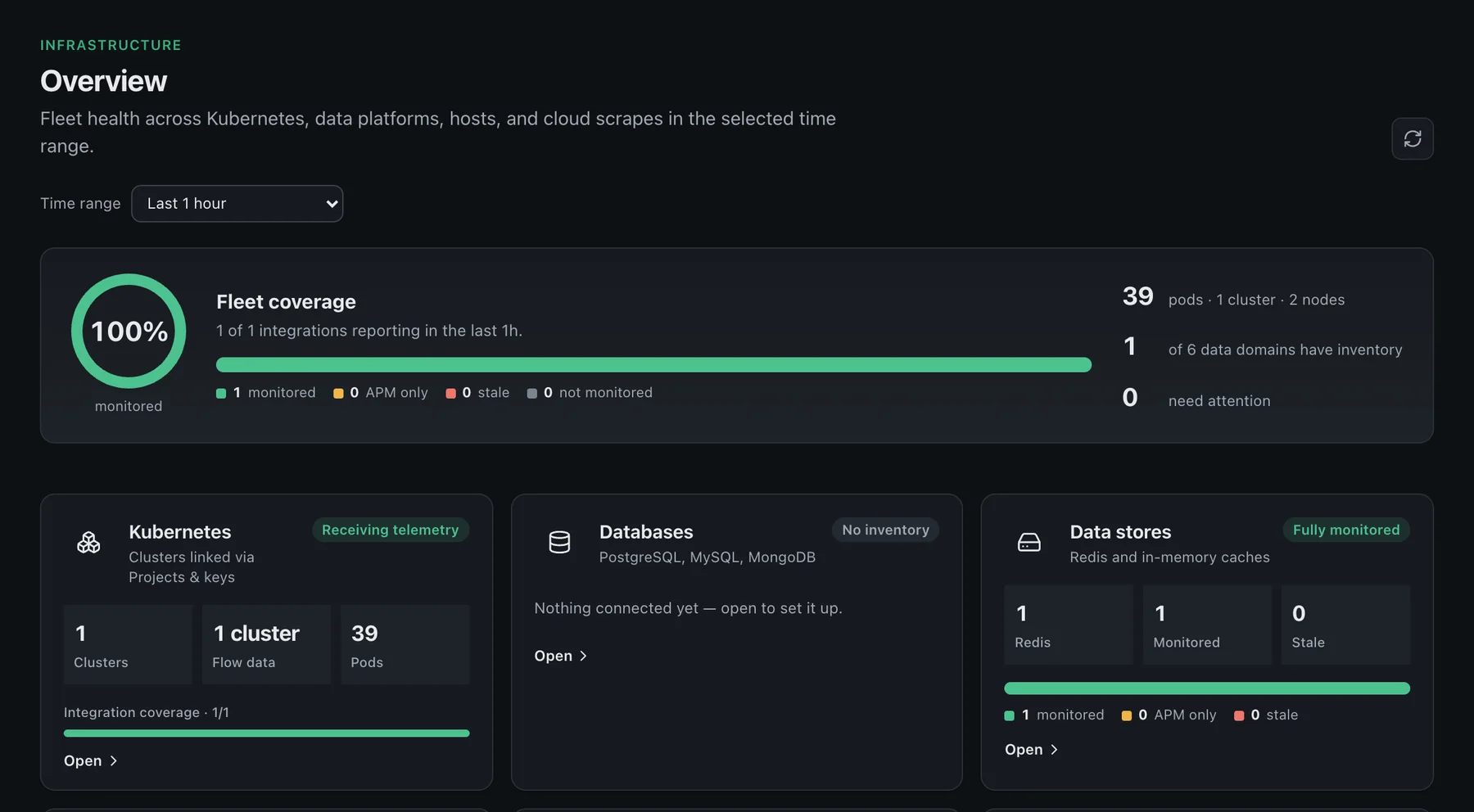
One fleet-health number, then drill in.
Kubernetes, databases, data stores, messaging, hosts, network devices and cloud in one overview, with what is and is not monitored stated plainly.
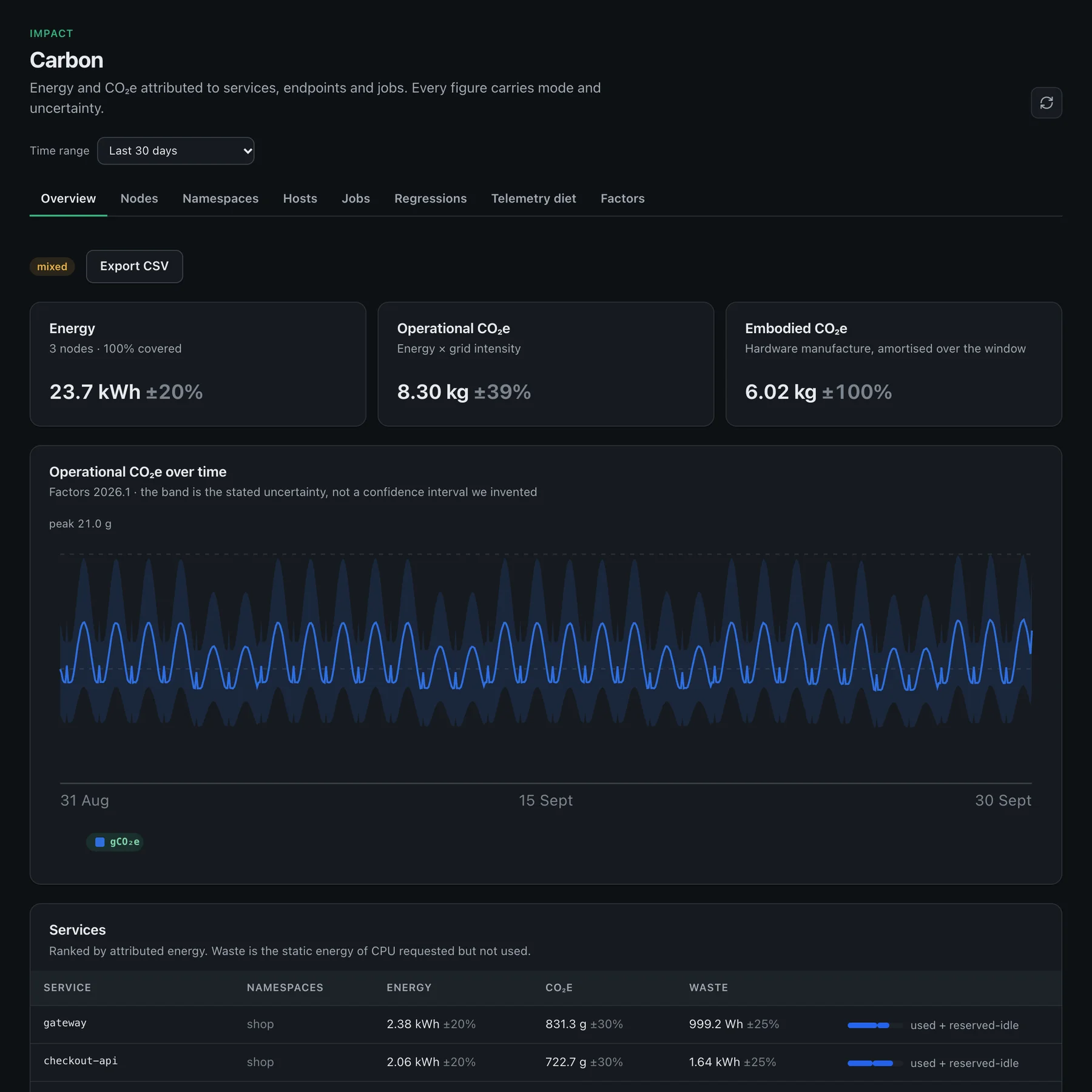
See the carbon cost of every service.
Operational energy and gCO₂e with uncertainty bands, ranked services, and regression markers — from the same OpenTelemetry data you already collect.
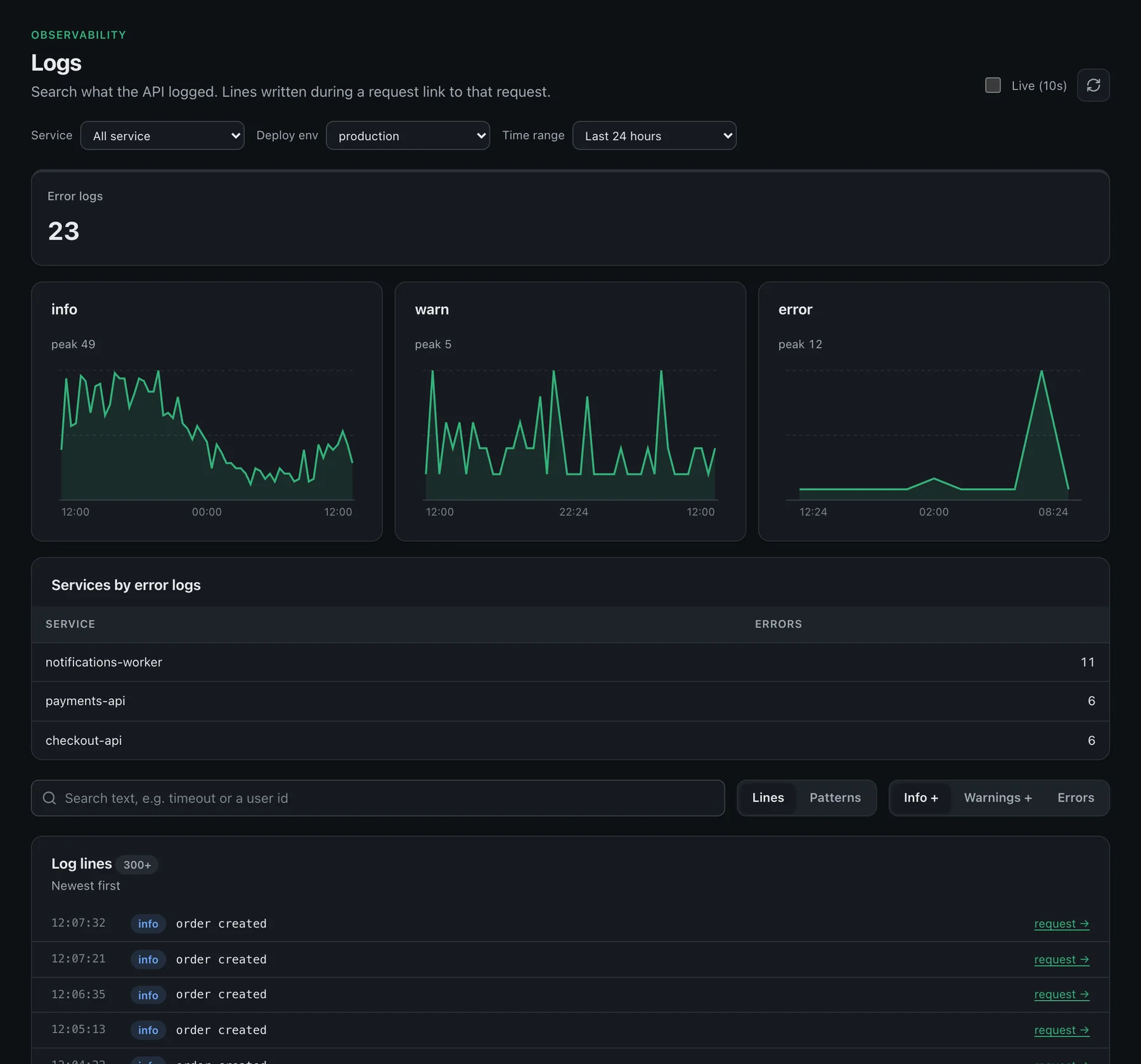
Logs that know which request wrote them.
Search what your services logged, see volume by level, and jump from any line to the request it belongs to.
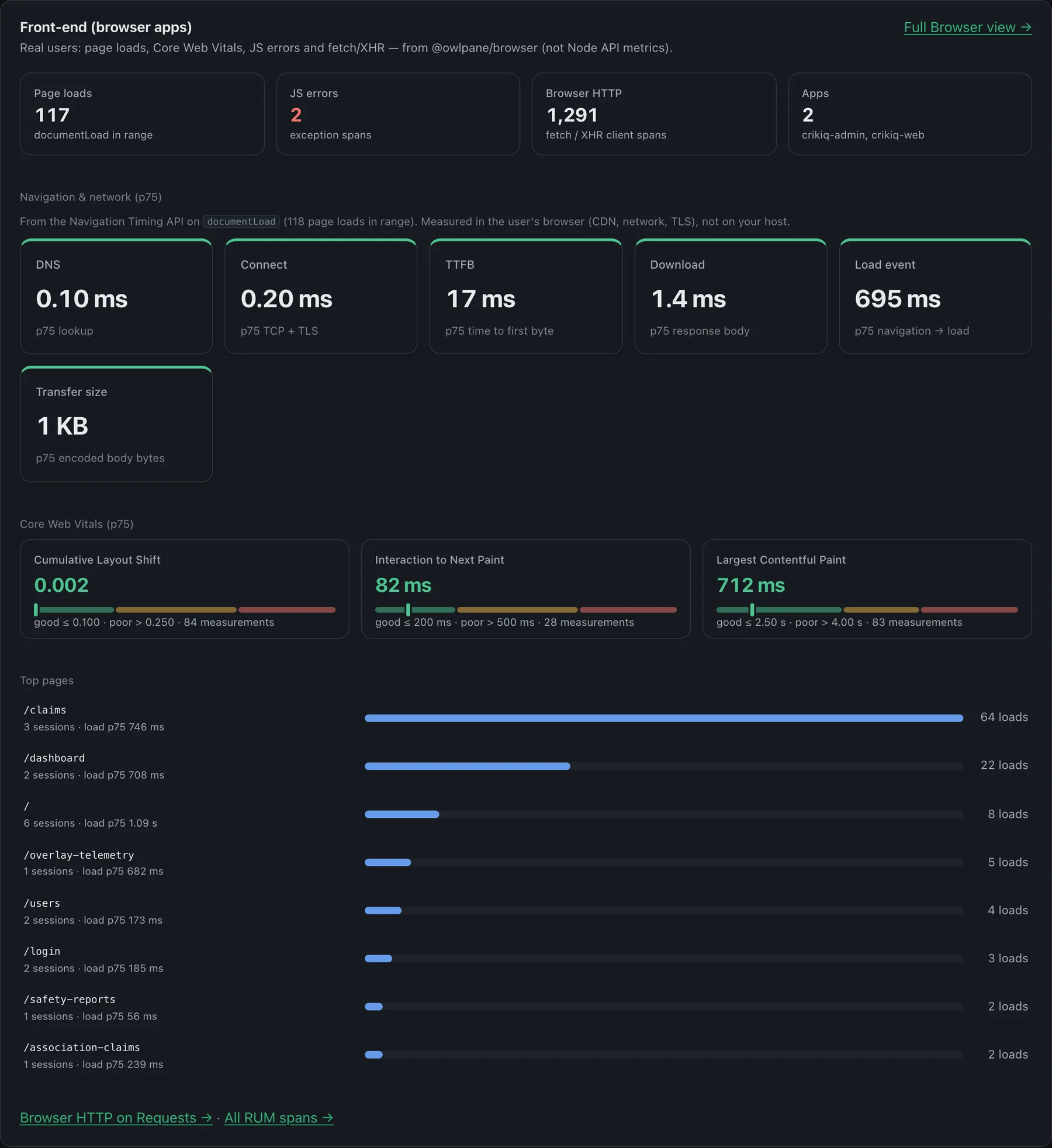
See what real visitors experience in their browsers.
Page loads, JavaScript errors and Core Web Vitals from real sessions, not a synthetic test from one region.
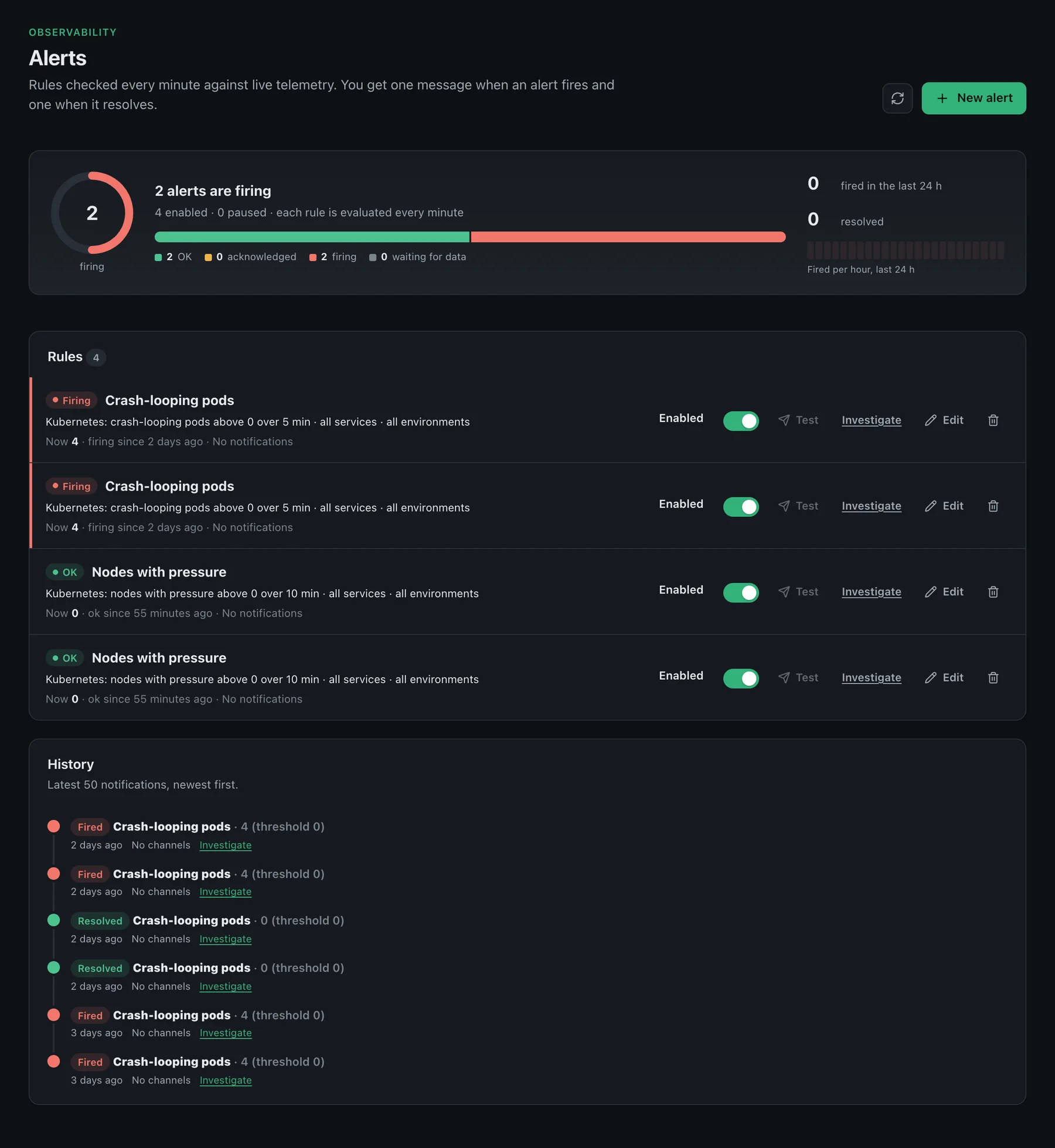
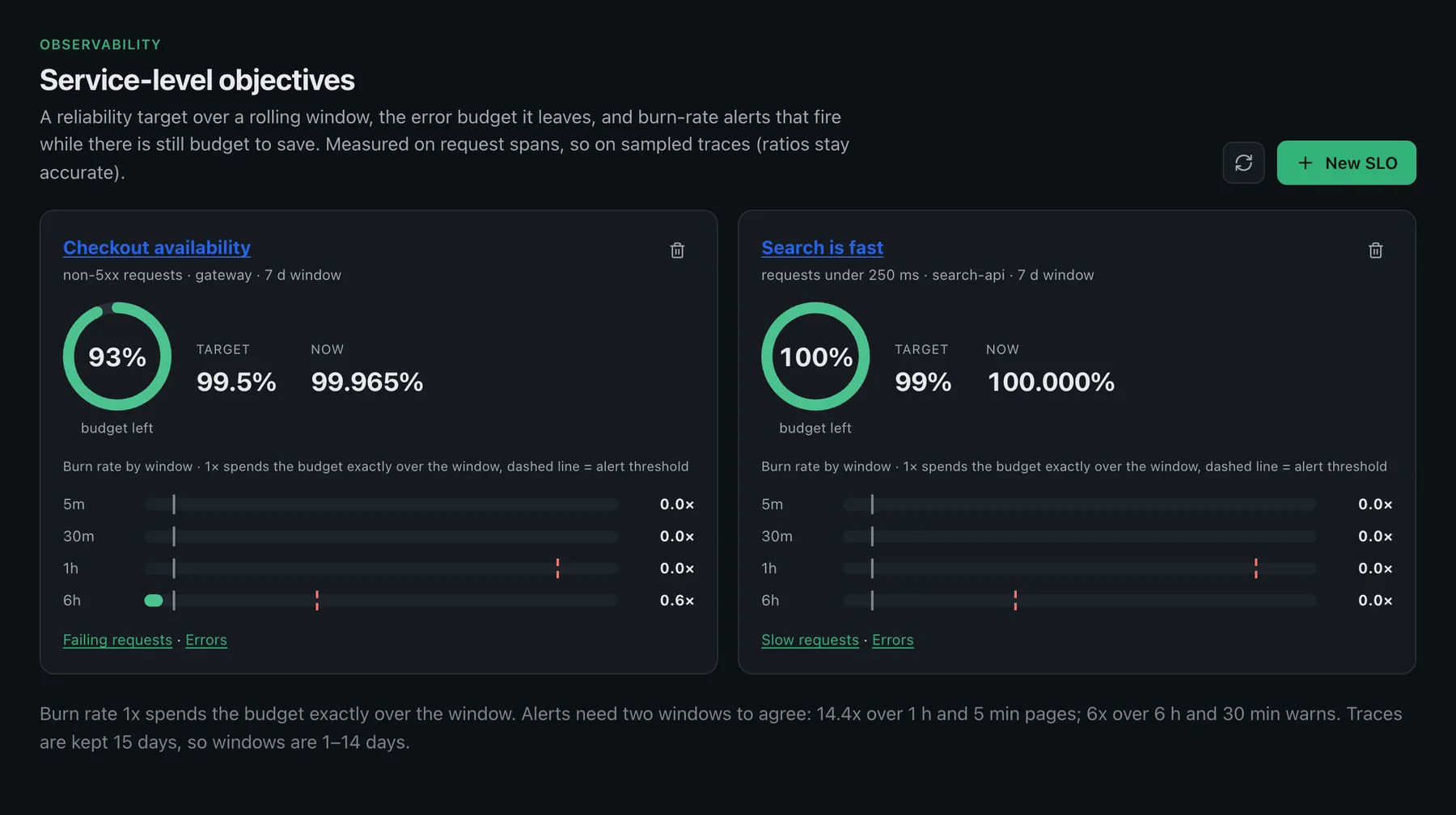
What is firing, what fired, and how much budget is left.
Rules checked every minute against live telemetry, with one message when something fires and one when it resolves, plus SLOs that warn while there is still budget to save.
- Alerts
- SLOs
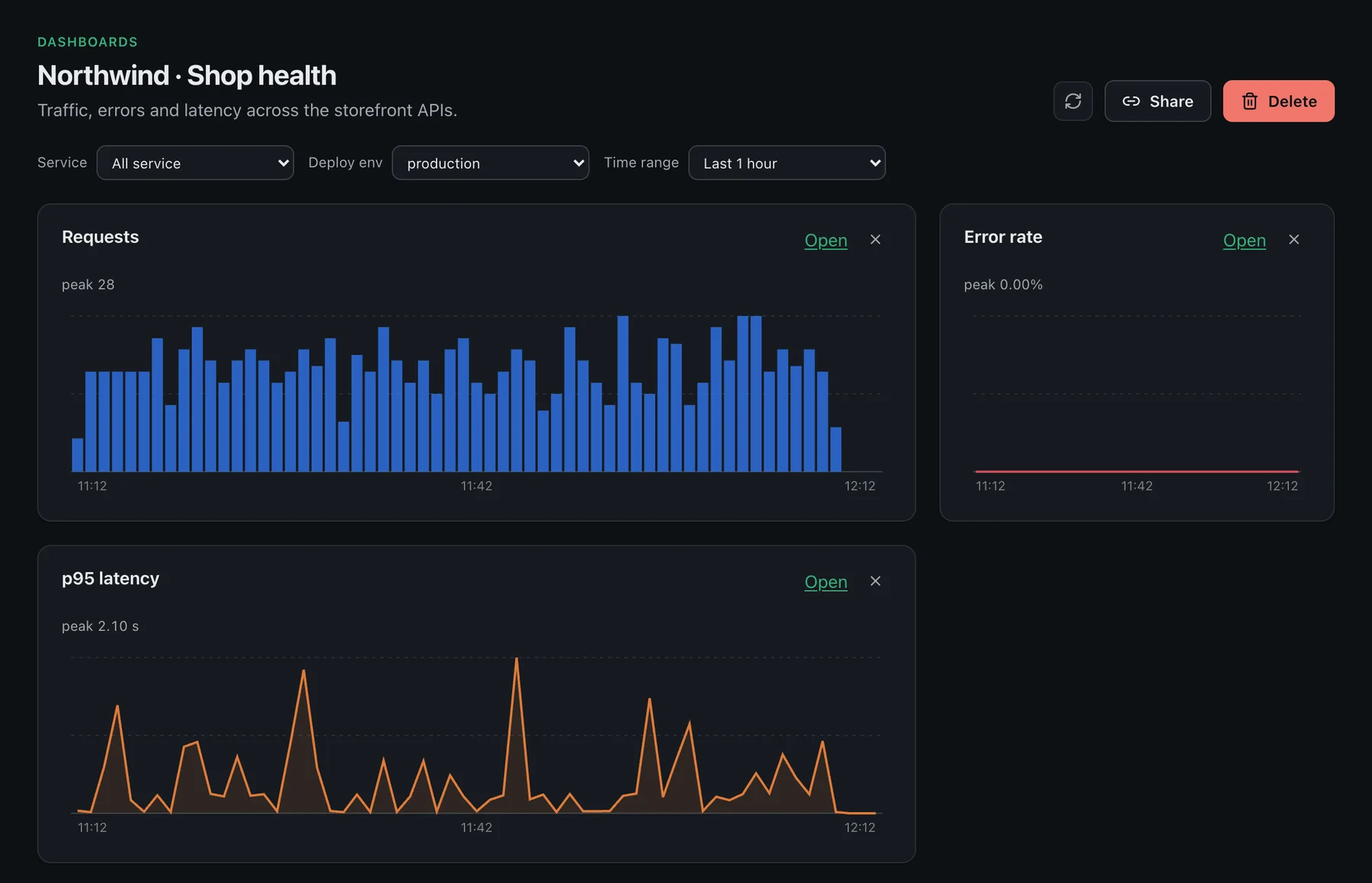
Charts your whole team can open from one link.
Named sets of charts for a wall display or a weekly review, each chart one click from the requests behind it.
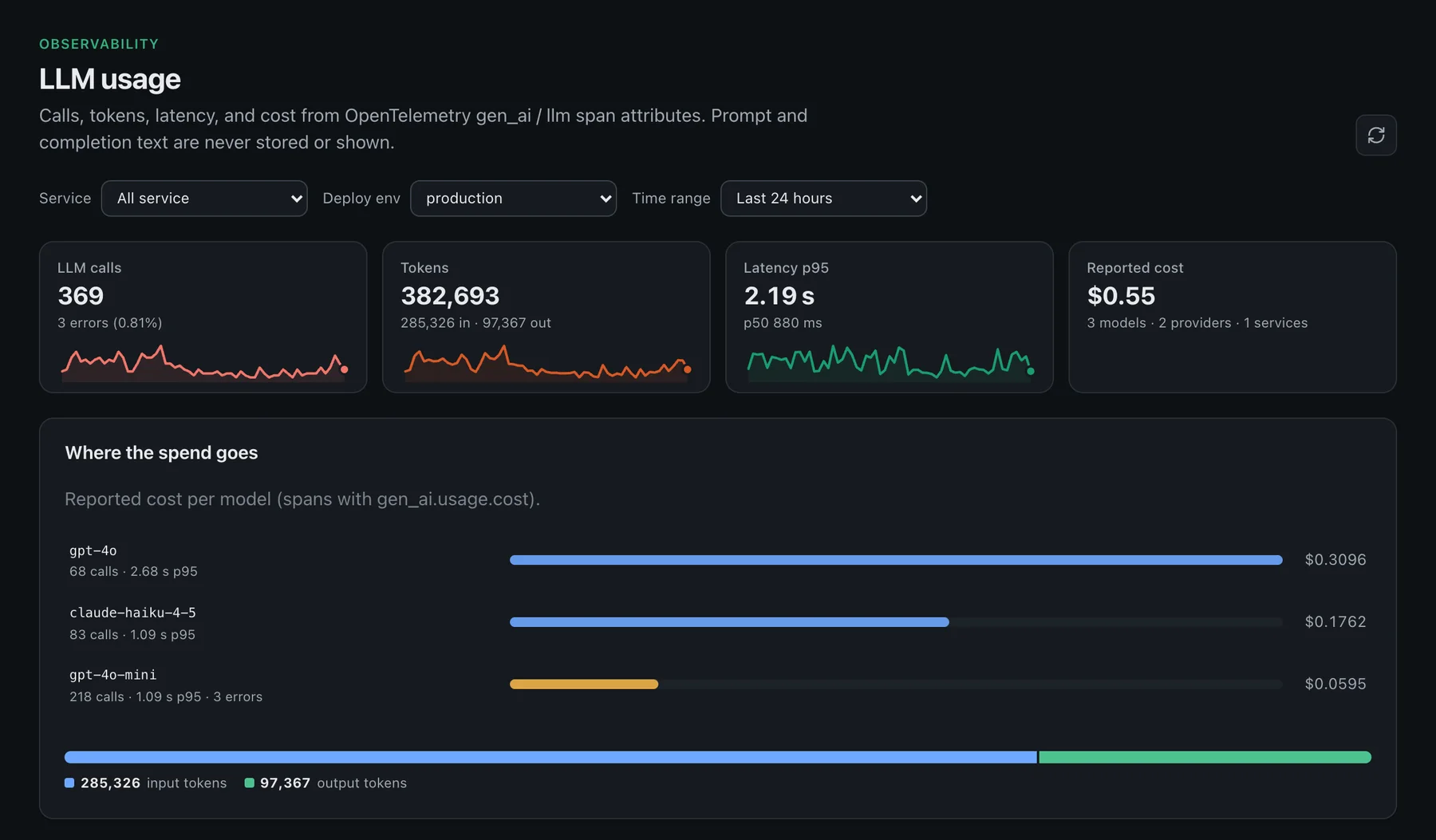
Know what your LLM calls cost before the invoice does.
Calls, tokens, latency and reported cost per model, from standard OpenTelemetry gen_ai spans. Prompt and completion text are not read or shown.
The problem
You're paying five vendors to answer one question
"What just broke, and why?" shouldn't take five browser tabs and a Slack thread to answer.
A different tool for every signal
APM here, log search there, uptime somewhere else, on-call in another tab. Nothing shares a trace ID.
Pricing that punishes growth
Per-host and per-seat bills that go up exactly when your product is finally getting traction.
A cluster you can bill but not see
You know what Kubernetes costs. You don't know why a pod OOMKilled at 2am until a customer tells you.
Alerts nobody trusts anymore
Too noisy to page on, too quiet to catch the thing that mattered. So everyone mutes the channel.
Products
One platform. Every layer of your stack.
Start with one product and add the rest when you need them — same ingest key, same bill.
Applications

Application performance
Traces, service map, errors grouped by release, database queries, cron jobs and queues.
Learn more →Infrastructure

Kubernetes monitoring
Cluster explorer, node and pod detail, network dependency map, security posture and safe restart/scale. Agent in beta.
Learn more →Infrastructure

Infrastructure monitoring
Hosts, PostgreSQL / MySQL / MongoDB, Redis-compatible caches, Kafka and RabbitMQ, SNMP network devices, cloud.
Learn more →Telemetry

Logs & search
Log search correlated with traces, attribute search across spans and logs, scrubbing before storage.
Learn more →Front end

Real user monitoring & uptime
Web Vitals, JS errors, session replay and synthetic uptime checks. Browser SDK in beta.
Learn more →Reliability

Alerts, SLOs & incidents
Alert rules, SLOs with burn-rate alerts, channels, and incidents in Jira or ServiceNow.
Learn more →Telemetry
Dashboards & metrics
Dashboards, a metrics explorer, templates, and Grafana-compatible reads.
Learn more →Intelligence

AI & assistants
Ask search, investigations, LLM usage and cost, coding-agent activity, read-only MCP.
Learn more →Impact
Carbon & energy
CO₂e per service, endpoint and job, with waste separated from useful work. On every plan.
Learn more →Solutions
Start from the problem, not the product.
Each use case is built from features that ship today — and says where Owlpane is narrower.

Incident investigation
From the alert to the request, release and log line behind it
Learn more →Release safety
Know within minutes whether the last deploy made things worse
Learn more →Critical user journeys
Real-user performance, uptime checks and the backend behind each click
Learn more →Kubernetes operations
Cluster inventory, pod health, network paths and safe restarts
Learn more →Jobs and queues
Cron jobs and queue workers as runs you can see and alert on
Learn more →LLM and AI features
Calls, tokens, latency and cost of the models your product uses
Learn more →
Tool consolidation
Traces, logs, metrics, uptime and alerts on one bill you can forecast
Learn more →
By team, or by the tool you use now
Developers, SRE and platform, engineering leaders — and honest comparisons for Datadog, Grafana, OpenObserve, Bronto, Logz.io, Checkly and more.
All solutions →Investigate
Follow the incident, not the tabs.
A deploy, a latency jump, an error spike, a slow query and a backed-up queue are one story. In Owlpane each of them already links to the exact requests, errors and logs behind it.
- Releases are marked on the charts, so you see what changed and when
- Every chart and card opens the matching requests, errors, logs or traces
- Alerts carry the evidence that fired them, and resolve when it clears
PreviewIllustrative incident. Each signal exists in the product today on its own page, linked to the requests behind it; the Incident timeline page puts deploys, alerts, uptime results and markers on one axis.
- 02:57checkout-api v2.14.0 deployedDeploy
- 03:01p95 latency 86 ms → 412 msLatency
- 03:025xx rate 0.04% → 6.8% · new error PaymentTimeoutErrors
- 03:03SELECT customers · p95 3× slowerDatabase
- 03:04job SyncInvoices · 12 failed runsJobs
- 03:04Alert fired · high 5xx rate · on-call pagedAlert
- 03:07v2.13.9 redeployed (rollback)Deploy
- 03:09p95 back to 91 ms · alert resolvedRecovered
Setup
Three lines. No config file to fight with.
One call, before your app boots. It does nothing until you point it at an ingest URL — so it's safe to leave in code that hasn't gone live yet.
- Auto-instruments HTTP, your database driver, and outgoing calls
- Traces NestJS
@Cronand BullMQ jobs with one install line, and any other job throughowlpane.job() - Tags traces with the signed-in user (an opaque id you pass with
owlpane.setUser()), for per-customer debugging
import { owlpane } from "@owlpane/node";

owlpane.start({
  service: "payments-api",
  release: process.env.GIT_SHA,
});

// that's it — every request, query,
// and outgoing call is now traced.
# any language with an OpenTelemetry SDK
OTEL_SERVICE_NAME=payments-api
OTEL_EXPORTER_OTLP_ENDPOINT=https://ingest.example.com
OTEL_EXPORTER_OTLP_HEADERS=Authorization=Bearer%20<ingest key>
# no proprietary agent, nothing to migrate laterhelm install owlpane oci://ghcr.io/owlpane/owlpane-agent --version 0.3.2 -n owlpane \
--set endpoint=https://ingest.example.com \
--set cluster.name=production-eu
# read-only cluster access; setup guide in the consoleAsk, don't hunt
Ask your telemetry a question.
Plain-language search, saved investigations and a read-only MCP server for your own assistants. They answer and link to the evidence; they never change anything in your systems.
Ask
The charts under each answer are the same aggregates as the rest of the console, so you can check the answer instead of trusting it.
Investigations
Save notes, console links and search URLs for an incident or a root-cause write-up, in one board your team can reopen.
Read-only MCP
Let a coding assistant query topology, flows, incidents and carbon. Read-only by design: there is no auto-remediation.
LLM and agent usage
Calls, tokens, latency and cost from OpenTelemetry gen_ai spans. Prompt and completion text are not read or shown.
How it works
From your code to your dashboard
Your apps
Spans, logs and metrics over standard OTLP.
Ingest gateway
Key resolves the tenant. Secrets scrubbed before storage.
Isolated storage
Per-tenant rules enforced in the database, in the EU.
Console
Drill from any chart to the requests behind it.
Instrument
Drop in the SDK, or point any existing OpenTelemetry exporter at Owlpane's ingest URL. No proprietary agent to install.
Ingest
Telemetry lands in a tenant-isolated cell, scrubbed of tokens and secrets before it is stored.
Understand
Dashboards, traces, and alerts are there immediately — no query language to learn, no dashboard to build first.
Attribute carbon
The carbon layer joins the same telemetry with node energy and hourly grid intensity to attribute CO₂e per service, endpoint and job.
What you need
A free workspace and an ingest key from Setup. Then either @owlpane/node, any OpenTelemetry SDK or Collector, or the Kubernetes agent.
What is scrubbed
Auth headers, cookies, query strings, emails, bearer tokens, card-like numbers and password or token values are removed before anything is stored. The Kubernetes agent has no permission to read Secrets, and the console shows ConfigMap key names only.
If you send more than your plan
Starter samples above 10 GB a month and stops at 20 GB. Team keeps to the spend cap you set by sampling, so the bill can't jump.
Where it lives, and for how long
In the EU, isolated per tenant in the database. 7 days on Starter; 30 days for traces and logs and 90 days for metrics on Team. Standard OTLP out if you ever leave.
Owlpane Carbon · on every plan
Energy and CO₂ are engineering signals too
Monitoring shows latency, errors and cost. Nothing tells a developer that this endpoint or this job made the software use more energy. Owlpane Carbon adds exactly that — on the telemetry you already send.
Per service, endpoint and job
CO₂e per request and per run, following the ISO-standardised Software Carbon Intensity method (ISO/IEC 21031:2024). Version 1 is duration-weighted — the bias is stated on the figure, not hidden.
Carbon regression alerts
Each service is compared with the previous equal window. When its energy or CO₂e rises past your threshold (20% by default) an alert fires, like an error regression. A window comparison, not a per-deploy attribution.
Waste separated from work
Reserved-but-idle capacity reported as its own figure, with the workloads responsible — energy you pay for that does no work.
Measured or estimated, always labelled
Hardware counters where they exist, published factors where they don't. Mode, factor-set version and uncertainty band on every number.
Carbon-aware timing
Grid intensity by hour (hourly for EU zones where ENTSO-E data is available) shows when the grid is cleaner. Hints only — Owlpane does not schedule your workloads.
Telemetry diet
How much telemetry you keep and the storage energy it implies — monitoring's own footprint, as an order-of-magnitude estimate rather than a measurement.
The method: SCI = (E × I + M) per R — energy times grid intensity, plus embodied hardware, per request. Grid intensity from hourly ENTSO-E when configured, with a versioned static factor table as fallback. The methodology is published and linked from the console Factors view.
Available on every plan, Free included, in the product console (/observability/carbon). Metered hardware validation on your own cluster is recommended before operational targets — see the published methodology. The Carbon product page →
Switching
Already on something else? Keep it. Try Owlpane beside it.
Because ingest is standard OpenTelemetry, you can send a copy of your telemetry to Owlpane without touching your current tool. Here is what that looks like, including what you would give up.
Datadog
Keep
Any OpenTelemetry instrumentation you already have. Your Datadog agent and account can stay in place while you compare.
Gain
One bill priced by data, with a cap that samples instead of surprising you. No per-host or per-module line items.
Give up
Breadth. Datadog has a much larger integration catalogue, plus network and security products we do not offer. Apps on the proprietary tracer need OpenTelemetry first.
Sentry
Keep
Sentry for what it does best, if you like. Send your backend traces and logs to Owlpane next to it.
Gain
Errors grouped by the release that introduced them, with a sample trace, beside your database calls, jobs, Kubernetes state and uptime checks.
Give up
Depth on the front end. Session replay and mobile crash reporting are thinner here, and in beta.
Grafana, Loki, Tempo
Keep
Prometheus remote write works today, and Grafana can read Owlpane metrics through a Prometheus-compatible endpoint.
Gain
One managed product instead of four to operate, with logs, traces and metrics that link to each other.
Give up
Ecosystem. PromQL support is a read endpoint, not full parity, and there is no library of community dashboards.
Datadog, Sentry, Grafana, Loki and Tempo are trademarks of their respective owners. Owlpane is not affiliated with or endorsed by them. Comparisons reflect publicly available information as of September 2026 and our own product today, and may change.
Send a copy. Change nothing else.
Add one exporter to your OpenTelemetry Collector. Your current tool keeps working, and Owlpane receives the same data.
Start with one service or ten percent of traffic, compare the answers you get during a real incident, then decide.
exporters:
  otlphttp/owlpane:
    endpoint: https://ingest.example.com
    headers:
      Authorization: "Bearer ${env:OWLPANE_INGEST_KEY}"

service:
  pipelines:
    traces:
      exporters: [your_current_exporter, otlphttp/owlpane]
Pricing
Priced by data, not by how many people you hire
No per-seat charge. No per-host tier. One meter: gigabytes ingested.
Prices exclude VAT and other taxes. Billed in the currency you choose.
Every plan: unlimited users, projects, hosts, Kubernetes clusters and alert channels. You pay for data, and nothing else.
- 10 GB ingested per month
- Sampled above 10 GB, stopped at 20 GB (2×)
- 7-day retention for traces, logs and metrics
- Unlimited projects and teammates
- Every alert channel, unlimited Kubernetes clusters and hosts
- Carbon: energy and CO₂e per service, endpoint, job and release
New workspaces start with a 14-day Team trial: 50 GB of ingest a month, 30-day retention and Team's alert channels. It ends on the free plan: your workspace and projects stay, and retention goes back to 7 days.
Get started free$290 billed yearly — you save $58
- 50 GB included, then $0.35/GB ($0.25/GB past 1 TB)
- A spend cap you set: your bill can't surprise you
- No per-seat or per-host fee
- 30-day traces and logs, 90-day metrics
- Unlimited projects
- Email, Slack, PagerDuty, Opsgenie, Jira and ServiceNow alerts
- Sampled above 2 TB a month, stopped at 4 TB
Billed monthly by Stripe. Usage is the data our ingest gateway receives, measured as it arrives (compressed, before scrubbing).
Billed yearly by Stripe for the base fee, two months free. Usage above the allowance is billed monthly. Choose yearly when you upgrade in Settings → Plan.
Get started Get started, pay yearly- Committed volume (typically 5 TB a month or more), invoiced monthly
- Dedicated cell and ingest hostname
- SSO (OIDC, SAML) and SCIM, audit log export
- Unmetered ingest in the product
- Direct line to the team
Final rate depends on your committed volume and is agreed with you.
Book a sizing call- Everything in Scale
- Retention set to your contract
- DPA, security review and custom contract terms
- Named contact and agreed support levels
Terms are agreed per customer.
Contact salesStarter is free up to 10 GB a month. Team is $29 a month including 50 GB, then $0.35 for every extra GB (and $0.25 past 1 TB). Scale and Enterprise are quoted for a dedicated cell.
You are billed for what arrives at the ingest gateway, not for what is stored afterwards, so scrubbing and retention never change the meter.
Questions
Straight answers
Is this a proprietary agent, or standard OpenTelemetry?
Where is my data stored?
What counts as a gigabyte on the bill?
What does a Team bill look like?
What happens if I send more than my plan includes?
What happens when the 14-day trial ends?
Do you support Kubernetes?
Is there a browser / RUM SDK?
@owlpane/browser SDK sends Core Web Vitals, errors and fetch spans that link to server traces when you propagate trace headers.What languages and frameworks are supported?
@owlpane/node), with tracing for NestJS @Cron and BullMQ jobs and an owlpane.job() wrapper for other background work. A browser SDK (@owlpane/browser) is in beta. For Java, Go, Python, Ruby and anything else, use the standard OpenTelemetry SDK pointed at your ingest URL — it works with Owlpane right now; thin Owlpane wrappers for Python, Go, Java and Ruby are still in progress.How is this different from Datadog or Dynatrace?
Can we self-host it?
Is carbon live?
Which workloads will carbon cover at general availability?
How accurate is per-endpoint carbon?
Ready when you are
Stop stitching together five dashboards at 3am.
Create a free workspace in minutes. Need Scale, Enterprise, yearly billing or help onboarding Carbon on a large fleet? Email hello@owlpane.com and tell us about your stack.